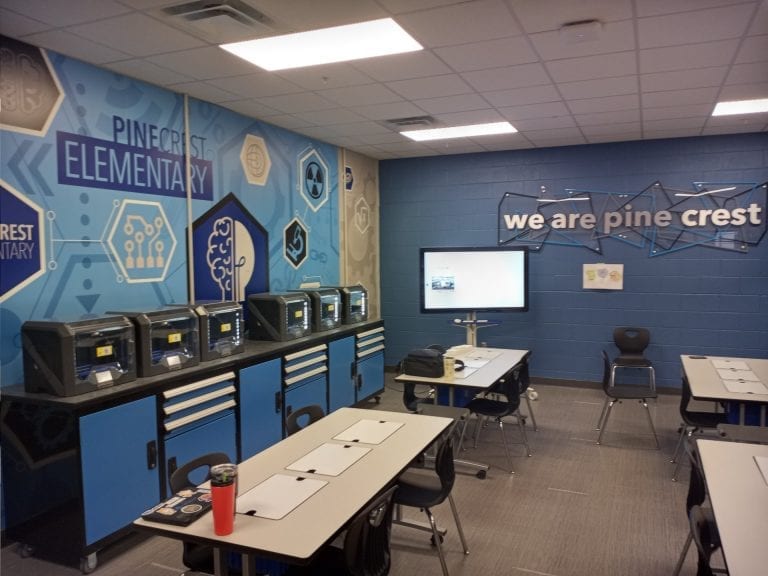
Makerspace Lessons Learned

From Prop to Prosperity: Lessons Learned from the Makerspace

By Taylor Ditzfeld, Collaborate Lab & Outreach Liaison

Many students who tour a college end up choosing their future school based on standout features they see during their visit — like a climbing wall in the gym or a film studio tucked into an academic building. But once they enroll, it’s not uncommon for those exciting amenities to go unused.

For a while, that was the case with our makerspace at State Fair Community College (SFCC).

SFCC serves about 3,700 students across eight campuses in Missouri, plus online learners. One of the most visually striking and technically advanced resources we offer is our makerspace, which is outfitted with 3D printers, laser engravers, vinyl cutters and more. Its cutting-edge capabilities and modern design made it a showstopper on every campus tour, but ironically, prospective students on tours were often the only ones regularly visiting the space.

That’s no longer true.

Over the past two years, we’ve seen tremendous growth — not only in student and staff participation, but also in engagement from K-12 schools and community partners. This shift didn’t happen by accident. For anyone looking to transform a seldom-used lab into a thriving hub of creativity, here are a few key lessons we’ve learned.

Building Reputation

The first step was simple but essential: make sure people know the space is for them.

We worked closely with our admissions and tour teams, encouraging guides to emphasize that the lab was open to all students, not just professors or STEM majors. High-tech spaces like ours can seem intimidating, especially to students who don’t consider themselves tech-savvy. However, by explicitly stating that it was a hands-on, welcoming environment for everyone, we started breaking down that barrier.

We also had to shift perceptions about how the space functioned. Many people thought of the lab as an order fulfillment center where instructors or students submitted jobs and the makerspace team would build the final product. While this wasn’t technically how we operated, the assumption persisted until we changed the narrative. We made it clear that our goal was to guide users through the creation process themselves. By supporting SFCC’s community in designing and producing their own work, we empowered them to build confidence and walk away with impressive, personalized projects they could truly take ownership of.

Today, the lab is busier than ever, with students and staff using it to explore new ideas and gain hands-on experience in ways that complement their learning.

Building Community

Beyond skill-building, the makerspace has also become a powerful tool for strengthening community.

For example, our adult learning program recently visited the space for a team-building experience. Though the program isn’t designed as an academic refresher, their visit showed how effective hands-on projects can be for bringing people together, regardless of age or background.

Our space was designed from the beginning with collaboration in mind. When we opened in Spring 2022, we worked with Palmer Hamilton to ensure the layout would foster connection. Instead of classroom-style rows, we opted for high-top and group tables, encouraging discussion, brainstorming, and teamwork.

Palmer Hamilton also helped us expand our impact with younger learners. Its INVENTORCLOUD platform provides ready-to-use, step-by-step projects for K-12 students across various skill levels. We’ve hosted field trips where students created everything from custom dog tags and laser-cut catapults to 3D-printed space modules. These accessible, guided projects have made technology feel exciting and approachable for students of all ages.

Within SFCC, the collaborative spirit is so strong that we’ve affectionately nicknamed the makerspace the “Collab Lab.”

One upcoming project really captures that ethos. Students in our Occupational Therapy Assistant (OTA) program are learning how to adapt toys for children with mobility challenges. They’ve partnered with students in our Engineering Design Technology program to create custom adaptive switches. Using input from the OTA students, the engineering students are designing parts in Fusion 360, which will be 3D printed and then affixed to the toys. These will be donated to local children during the holidays — a meaningful, interdisciplinary effort that showcases the true power of collaboration.

Building Momentum

As the lab’s internal use grew, we began looking outward and found new opportunities where we hadn’t expected them.

Originally, we assumed most local businesses already had access to advanced design and fabrication equipment. That turned out to be wrong. When we began reaching out and offering the makerspace as a resource, the response was overwhelmingly positive. Not only did it allow us to build stronger connections with the community, but it also boosted visibility for both our lab and our college.

Throughout this entire journey, Palmer Hamilton has remained a valued partner. From outfitting our space with collaborative furniture to supporting our K-12 programming with INVENTORCLOUD resources, their team has consistently helped us bring our vision to life. The PHabLab team in particular has offered ongoing encouragement, ideas and support to keep us moving forward.

If you’re looking to elevate the impact of your makerspace, I can’t recommend Palmer Hamilton enough. Growth takes time, but with a clear strategy, inclusive programming and strong partners, you can turn your makerspace from a tour stop into a vibrant, hands-on learning environment where creativity and community thrive.

Taking the Guessing out of Makerspaces

The thought of including a makerspace can be intimidating. You know you should have one in your school, but where do you start?
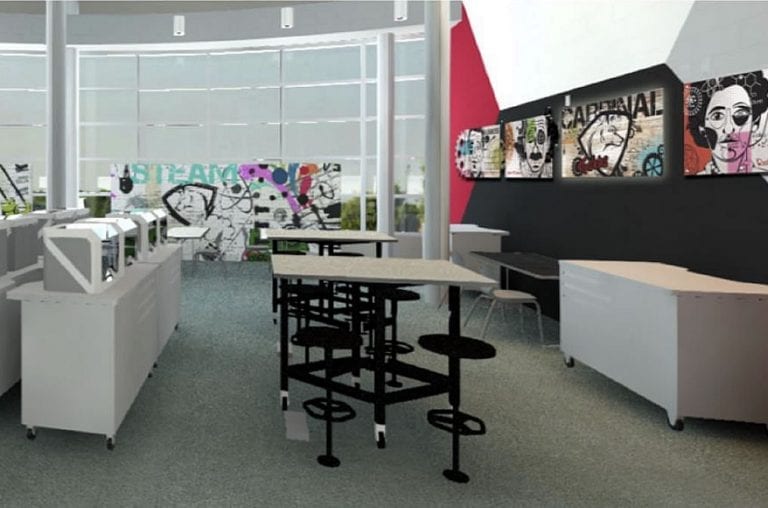
A successful makerspace needs to start and end with essential steps. By following these steps, a school can feel confident that their makerspace has been designed and built to fit their needs exactly.

PHabLab starts with an in-depth conversation about the goals a school has for the space. Some don’t know their goals other than to have a lab. Through this initial counseling, clients learn about the details, inclusions, timeline and finished space that would be ideal for them. This goal setting is an essential first step in the process, and a school needs the experience of a partner who understands, practices and excels at this.

Once that goal is established, the school is presented with a design book that includes the detailed plan and cost. This valuable resource not only consolidates all the information, but it can also be used for grant proposals and board presentations. Palmer Hamilton serves as a resource and a subject matter expert for the school, supporting them in presentations, answering questions and making the process clear to interested parties.

These steps are essential for accurate lab design, creation and usage. PHabLab guides a client through these steps, educating them at each step of the process.

Once the contract is signed, the order is filled – with every element of the PHabLab tailored for that school. From the devices to furniture and even the school-specific art on the walls, everything is being created for that school’s PHabLab.

There are a lot of pieces that are included in a PHabLab and many schools worry that installation will take too long and interfere with their schedule. PHabLab installs the custom labs over two days so they don’t have to miss a beat. School departments that need to function with the new lab have already been working with PHabLab, ensuring connectivity and operation as soon as it’s installed.

PHabLab experts arrive on-site for a thorough two-day orientation on the usage of digital fabrication tools and software, preparing school personnel to be effective makerspace teachers. This support continues for a year after installation where additional professional development is available, as well the ability to bring on student certifications through NC3. Another way to jump-start PHabLab is by utilizing the makerspace curriculum, INVENTORCLOUD. This comprehensive platform helps teachers facilitate all the lessons and projects students need to succeed in this space.

One recent client in California, the San Jacinto Unified School District, went through these steps with PHabLab and their learning lab is now being used by hundreds of students. They say that the counseling, expertise and finished product exceeded their expectations. To hear learn more about this successful partnership, watch the video and listen to the educators in their own words.

Let’s Do a Fab Lab Together

Making a Makerspace

Michale Allen, Curriculum Development Coordinator – PHabLAB;
Stephanie Hein, Program Director – PHabLAB

Non-traditional learning that emphasizes collaboration and hands-on experiences has steadily grown in popularity thanks to the many benefits it offers students and staff. Dedicated makerspaces within schools are an invaluable component of this kind of learning and offer a resource that can be shared by the entire community.

The unfamiliar design and technology in a makerspace can cause implementation to be a bit of a challenge for schools. However, by joining with a full-service space designer that focuses on making the space customizable, functional and sustainable, schools can be confident in its success.

Customizable

Building a customizable space starts with meeting schools where they are. In addition to typical considerations, such as the size of the school and age of the students, existing initiatives need to be taken into account as well. Some schools have already incorporated career and technical education (CTE) into their curriculum before they start building a designated space, and some are starting from square one. Where the school falls on that spectrum informs how robust the space’s capabilities and the team’s support need to be.

Understanding the school’s existing experiential learning offerings is also important in determining which machines to put in the makerspace. Vinyl cutters are often a good first step and a common hobby machine that educators may be familiar with. Laser cutters are similarly easy to use and efficient. Another popular and accessible choice is a 3D printer, but those can be a bit time-consuming for shorter class periods. Computer numerical control (CNC) machines are the most complex, but an entry-level version in a makerspace can help introduce students to the technology they will use in future CTE classes. Every school has a machine (or machines) that will best serve its needs and inform the design of the rest of the space.

Another customizable feature unique to makerspaces is moveable furniture. Unlike most classrooms that service a single teacher or subject area, makerspaces are traditionally used as a communal resource open to everyone. While this is a testament to the utility of makerspaces and STEM/STEAM learning in general, it also means that the space needs to be adaptable to a variety of ages, subjects and project types. Installing mobile furniture allows educators and students to quickly and easily transform the space into what they need without taking time away from learning.

Functional

Schools implementing a makerspace want to be sure they do it right. No one wants to spend the money for a 3D printer and have it sit unused in a classroom. Bringing in expert help can be the key to ensuring the investment has the support it needs for long-term success.

One area where experienced professionals can improve a school’s maker program is with ongoing staff training. For example, PHabLAB will aim to train at least a dozen school staff members from a variety of different subjects on how to use the machines in the makerspace. After the initial training, PHabLAB remains a resource for schools to use in ensuring the longevity of the maker programs. Training for teachers is always available if more staff is interested in using the space or there is significant turnover within the school. This ensures that there are no gaps between knowledgeable instructors who can take advantage of the makerspace.

Another resource PHabLAB provides to help schools build their program is a library of projects. These activities range in subjects and difficulty, and each project comes with a list of necessary materials and instructions. Teachers can incorporate these into their existing curriculum as they become comfortable with the space and its machines.

Both of these offerings combine with the years of design experience to create not only a space, but a program that schools can be proud of.

Sustainable

A makerspace is a considerable investment, and school administrations need to be confident that they will be usable for a long time. As with all Palmer Hamilton products, the furniture delivered by PHabLAB is highly durable for safe and long-lasting use.

In addition to the physical space, the value the programs themselves provide to students makes them highly sustainable as well. There is a lot of demand for skilled workers in the job market, and these makerspaces introduce students to important technology they could use to build a future career. Many schools have opted for 3D printers or CNC machines because students can become certified in their use, an excellent addition to any resume. In the short term, there are also a lot of students who do not respond well to traditional lecture-based instruction and can become disengaged from learning and their peers. Makerspaces offer another opportunity for those students to find something they can excel in at school, so they are excited to come to class every day.

Essentially, the cornerstones of a quality makerspace are the same as the projects made within them. Does it fit the needs of the application? Is it made with a solid foundation and the right materials? And, will it be around for as long as it needs to be? Answering yes to all these questions is critical to ensuring your makerspace makes the grade.

Breaking Down Buzzwords

STEM, STEAM, makerspaces, fab labs…these are buzz words in the education world but what do they mean and why are they important? Let’s break it down.
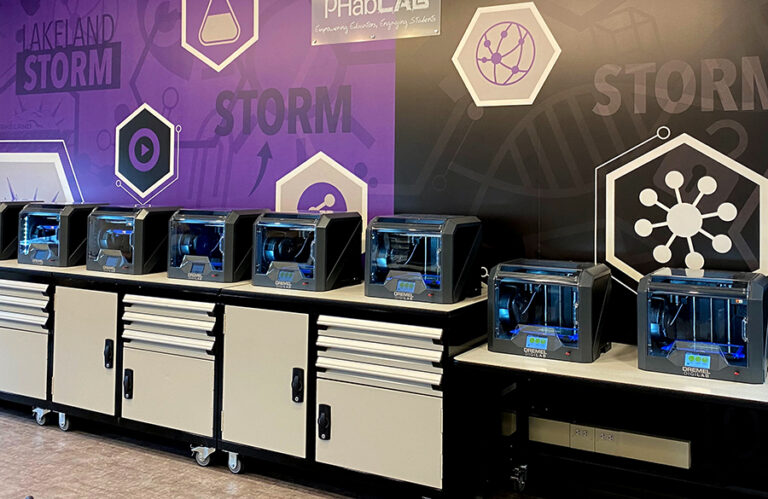
What is STEM and STEAM? STEM is an acronym for four subject areas: Science, Technology, Engineering, and Math. In 2013, STEM evolved into STEAM, which includes A for Art. Art was added because of the natural connection between analytical subjects like Science, Technology, Engineering, and Math and the creative subjects of the Arts. Think about it. Professions such as graphic design, animation, product design, architecture, and even landscaping require both artistic and technical skill sets. For example, an architect cannot bring a creative vision to life without the technical knowledge of 3D modeling and computer-aided design. The addition of Art is also significant because it makes STEM subjects more accessible and relatable for students who may not initially be drawn to those areas. Despite the addition of Art almost a decade ago, STEM and STEAM remain generally interchangeable.

Why are STEM and STEAM important? Although the emphasis on STEM/STEAM education is not a new trend, it continues to be important for several reasons. First, STEM/STEAM disciplines help students learn widely applicable skills for success including critical thinking, problem solving, and creativity. Second, STEM/STEAM disciplines give students knowledge to better understand and navigate the world around them, from the science behind the food they eat to the technology in their smart phones. Finally and perhaps most importantly, according to the US Department of Commerce, STEM occupations grew three times faster than non-STEM occupations over the past decade. Therefore, the future of the US economy and innovation relies on a pipeline of STEM/STEAM-savvy students.

What are makerspaces and fab labs? Makerspaces, fab labs, hackerspaces, maker hubs…the list goes on. There are slight differences between these terms but generally they describe spaces designed for “making” and can be found in schools of all levels, libraries, museums, and community centers. There are even makerspaces in people’s garages, mobile makerspaces in trailers, and mini makerspace carts in classrooms. These spaces can include everything from computer-controlled fabrication machines, traditional hand tools, electronics components, and AV equipment to sewing machines, virtual reality equipment, recyclables, and craft supplies. In the education world, these spaces are often used to provide creative hands-on learning opportunities, encourage teamwork and collaboration, teach technical skills, and promote cross-disciplinary learning experiences.

Why are makerspaces and fab labs important? Makerspaces are important because they contrast the traditional classroom experience. The ideal makerspace experience reflects more of a professional setting than the traditional classroom. For example, students are often presented with an open-ended design challenge or problem to solve within a set of criteria and constraints. Successfully completing the challenge or solving the problem requires teamwork, iteration, giving and receiving feedback, flexibility, and can even emphasize practical skills such as budgeting and time management. Furthermore, students must leverage different skills from different team members. A well-executed makerspace helps students learn these real-world skills and sets them up for success, regardless of the career path they choose.

Let’s Do a Fab Lab Together PHablab logo

Palmer Hamilton’s PHabLAB spaces are innovative project-based learning (PBL) environments that incorporate exploration in digital fabrication, creative thinking, collaboration, and problem solving.

PHabLAB Process Brochure

Using 3D Printing to Teach

Over the past decade, the use of 3D printing in education exploded in popularity. While schools quickly jumped on the trend, educators often struggle to use 3D printers as an effective learning tool in the classroom. Fortunately, the 3D printing process incorporates several relevant real-world skills that can be easily emphasized in the classroom.

1. Spatial Reasoning Spatial reasoning, or the ability to think about objects in three dimensions, is a critical skill in fields such as science, technology, engineering, art, and mathematics. Even though children begin to develop spatial reasoning skills as babies and toddlers, schools rarely emphasize it until after elementary school. Computer-aided design, the step in the 3D printing process when a three-dimensional digital model is created, requires spatial reasoning. For young students or students new to 3D printing, they can begin by designing in a beginner-friendly computer-aided design program such as Tinkercad. Successfully designing an object in Tinkercad requires students to view their design from multiple angles, manipulate simple shapes, and move shapes within an XYZ plane.

2. Fine Motor Skills Fine motor skills, or the coordination of small muscle movements, are important for the completion of everyday and academic tasks. Writing with a pen or pencil, tying shoelaces, flipping the pages of a book, and coloring within the lines are all examples of fine motor skills. Fine motor skills can be emphasized in multiple steps of the 3D printing process including during prototyping, computer-aided design, and post-processing as students build models with their hands, control a mouse or keypad, or paint their 3D printed object.

3. Computer and Technology Literacy The 3D printing process is also an effective way to teach computer and technology literacy skills. The computer-aided design step requires students to use some type of design software where they can practice everything from keyboarding to saving and downloading files. 3D printing itself provides opportunities for students to learn about hardware, operate a machine, follow safety procedures, and oftentimes navigate cloud-based software. Learning the computer and technology literacy skills associated with 3D printing opens the door to career paths including product design, manufacturing, and engineering.

Focusing on the skills above not only enhances the value of 3D printing as a tool for learning but can also provide clarity and a starting point for educators struggling to implement 3D printing in their classroom.

Let’s Do a Fab Lab Together PHablab logo

Palmer Hamilton’s PHabLAB spaces are innovative project-based learning (PBL) environments that incorporate exploration in digital fabrication, creative thinking, collaboration, and problem solving.

PHabLAB Process Brochure

Fab Lab Summer Fun

So, it’s summertime. You have a fab lab or maker space equipment. School is out or summer camps are starting. What do you do to make the best use out of your equipment and space? Well…. It is summertime. Why not make some summer fun out of the space? Summer is a time for fun in the sand, the sun, and sandals. With a little bit of creativity and tinkering, you can make the most out of your fab lab during the summertime!

3D Printing

Imagine you are at the beach with your family and friends. Wouldn’t it be neat if you could build your own sandcastle out of custom molds you created? You can do just that with 3D designing and printing. Using Tinkercad, you can design your own sandcastle molds. In my example, I created a sandcastle mold out of cylinders and a cone. The opportunities for molds are as endless as your imagination. If you can think it or dream it, you can make it reality. Follow these simple steps to get started:

  1. Develop an idea for the type of mold you want.
  2. Sketch it out or start designing in Tinkercad.
  3. Remember, your objects need to be hollowed out to fill with sand. To learn how to make a solid object into a hollow object, watch this video we created. It will show you how to hollow out a cone. You can use that same concept for other objects as well.
  4. Finalize your mold and print!

Laser Cutting

Another fun project to do in the summer when everyone is drinking ice-cold drinks to cool off is cork or wood coasters. Drink coasters are an easy laser engraving project that can give you custom, unique coasters for your cold drinks that may sweat onto other surfaces. Make it special by using photos of family and friends to engrave onto your coasters. Follow these simples steps to get started:

  1. Find or create an image to engrave
  2. Purchase or repurpose wood or cork coasters. I prefer cork due to its ability to flex and absorb moisture well.
  3. Use your Laser Cutting/Engraving software to load your project and engrave your coasters.
  4. Enjoy your cold drink without worrying about the moisture. No Sweat!

Opportunities are endless…

The number of projects you can do are as endless as your imagination. For example, I had a kitchen drawer break and the rail support I needed was no longer produced. So, I grabbed a caliper and began taking measurements. I used my Dremel 3D45 to print the object in PLA and I now have a functioning kitchen drawer. Use your imagination and creativity to make your summer fun and productive!

Let’s Do a Fab Lab Together PHablab logo

Palmer Hamilton’s PHabLAB spaces are innovative project-based learning (PBL) environments that incorporate exploration in digital fabrication, creative thinking, collaboration, and problem solving.

PHabLAB Process Brochure

Using Laser Cutters

Laser cutters were created over half a century ago, but the skills learned from it continue to gain importance into the 21st century. The use of laser cutters in modern and future industry is growing. The automotive, medical, aerospace, and fashion design industry are a few of the many industries using laser cutters. The laser cutters provide students with applicable skills in modern industry within an educational environment.

  • Failure as a learning tool – Project based learning uses the design process to emphasize failure can be an option to accomplish the end-goal of a product design. Design process is the cyclical process of problem solving by designing and iterating a solution until the desired outcome is achieved. It IS rocket science. Elon Musk’s SpaceX program had numerous rocket launch failures before successfully returning re-usable rockets to a platform floating at sea. Failure is an important learning tool for real-world problem solving and can be used in everyday life or in rocket science.
  • Production Efficiency – Production efficiency is the economic term associated with optimizing production to gain the most output in an efficient manner. This process involves reducing wasted material, minimizing redundant operations, and making the most out of every second of time. For example, a sheet of metal that is to be laser cut to create the same part numerous times could have the design placed in a manner that reduces wasted space/material. In terms of real-world skills, companies are constantly trying to find ways to be more efficient while maintaining quality. Efficiency is important to employers across the globe.
  • Creative design skills – Before you can laser cut, you need a design. The design can be as simple as hand-drawn art or as complex as a vector image design using illustrative software or CAD software. The product can be as simple as a laser engraved wooden ornament or as complex as a laser-cut bar stool. Designing the product to be engraved/cut is the first step in any production process.

While we have limited the article to three skills, the list is endless. The take-away should be that laser cutters are not just a tool for hobbyists to create cool, chic products for an Etsy store. Laser cutting teaches life-long, real-world applicable skills that employers in numerous industries are seeking in their employees. Skills that will produce the next Elon Musk or Vera Wang.

Let’s Do a Fab Lab Together PHablab logo

Palmer Hamilton’s PHabLAB spaces are innovative project-based learning (PBL) environments that incorporate exploration in digital fabrication, creative thinking, collaboration, and problem solving.

PHabLAB Process Brochure

Hawaii

Sales Representatives

Ty Maras
CRO – Palmer Hamilton LLC
tmaras@palmerhamilton.com
1.800.788.1028 ex. 903
Or see Teri Wilson-Ruggles

Teri Wilson-Ruggles
Director of PHDesign
truggles@palmerhamilton.com
1.920.517.7809
Or see Ty Maras

Customer Experience Representative

Aimee Duchemin 
aduchemin@palmerhamilton.com
1.262.274.4916